How to Build an MCP Server in Python (2026-07-28 Spec, SDK 2.0)
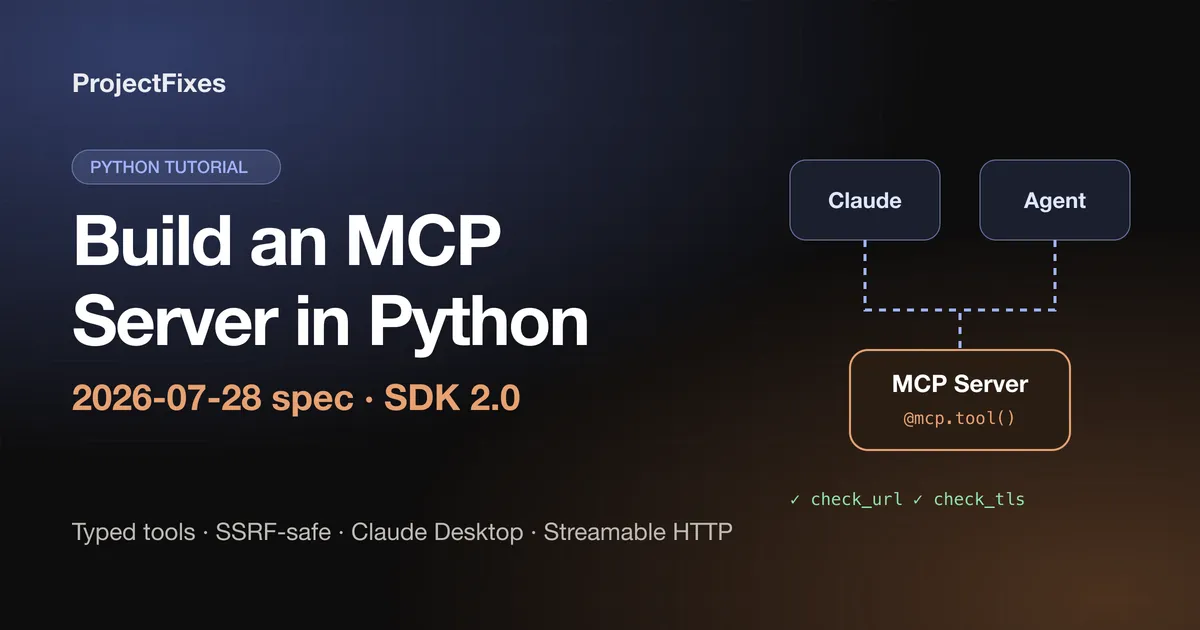
Build a working MCP server in Python with the MCP SDK 2.0 and the new stateless 2026-07-28 spec — typed tools, SSRF-safe networking, Claude Desktop setup and Streamable HTTP. Every line tested.
On this page
Most MCP tutorials you’ll find were written for an older version of the protocol — and an older Python SDK. The 2026-07-28 specification made MCP stateless, removed the initialize handshake and sessions, and the Python SDK 2.0 renamed the class everyone used (FastMCP is now MCPServer). Copy an older tutorial today and you’ll hit import errors before you write your first tool.
In this guide we’ll build something more useful than the usual weather demo: a Site Health MCP server that lets Claude (or any MCP client) check whether a website is up and when its TLS certificate expires. Along the way you’ll learn the parts that matter in production: typed structured output, error handling the model can read, and an SSRF guard so an AI can’t be tricked into probing your internal network.
Every code block below was run against mcp 2.2.0 on Python 3.12, over both stdio and Streamable HTTP.
What changed in MCP 2026-07-28 (and why old tutorials break)
If you only read one section, read this one. The official changelog lists nine major changes; these are the ones that affect how you write a server:
- MCP is stateless. The
initialize/notifications/initializedhandshake is gone. Every request now carries the protocol version and client capabilities in its_metafield. - No more sessions. The
Mcp-Session-Idheader is removed from Streamable HTTP, andtools/listcan no longer vary per connection. If you need state across calls, return an explicit handle from one tool and accept it as an argument in another. - New required
server/discovermethod that advertises supported versions, capabilities and identity. The SDK implements it for you. pingandlogging/setLevelare removed, and Roots, Sampling and Logging are deprecated. For logs, write tostderr(stdio) or use OpenTelemetry.- Server-to-client requests are replaced by Multi Round-Trip Requests. Instead of calling the client mid-request, a server returns an
input_requiredresult and the client retries with the answers. Every result now has aresultTypefield. - Subscriptions moved to
subscriptions/listen, replacing the old GET stream andresources/subscribe.
The practical upshot for a Python developer: use SDK 2.x, don’t rely on per-connection state, and treat each tool call as independent. The SDK handles the wire-level changes.
What we’re building
Two tools an AI assistant can call:
check_url(url)— is this site reachable, what status code, how fast, how many redirects?check_tls_certificate(hostname)— who issued the certificate and how many days until it expires?
Both return typed structured data, not just text, so clients get a JSON Schema describing the output and the model gets reliable fields to reason about.
Prerequisites
- Python 3.10+ (the SDK requires it)
uvfor project and dependency management- An MCP client for testing — Claude Desktop, or the Python client we’ll write
Create the project and add the SDK. The cli extra installs the mcp command-line tool, and httpx2 (the HTTP client the SDK itself uses) and pydantic come along with it:
       uv init site-health
cd site-health
uv add "mcp[cli]"
The complete server
Save this as site_health.py:
       """Site Health MCP server: lets an AI assistant check uptime and TLS certificates."""

import asyncio
import ipaddress
import logging
import socket
import ssl
import time
from datetime import datetime, timezone
from urllib.parse import urlsplit

import httpx2
from mcp.server import MCPServer
from mcp.server.mcpserver.exceptions import ToolError
from pydantic import BaseModel

# stdio servers must never print to stdout - log to stderr instead.
logging.basicConfig(level=logging.INFO)
logger = logging.getLogger("site-health")

mcp = MCPServer(
    "site-health",
    instructions="Check whether public websites are up and when their TLS certificates expire.",
)


class UrlCheck(BaseModel):
    url: str
    final_url: str
    status_code: int
    ok: bool
    response_ms: int
    redirects: int


class CertCheck(BaseModel):
    hostname: str
    issuer: str
    expires_at: str
    days_remaining: int


async def assert_public_host(hostname: str) -> None:
    """Refuse hosts that resolve to private, loopback or link-local addresses (SSRF guard)."""
    loop = asyncio.get_running_loop()
    infos = await loop.getaddrinfo(hostname, None, type=socket.SOCK_STREAM)
    for *_, sockaddr in infos:
        ip = ipaddress.ip_address(sockaddr[0])
        if not ip.is_global:
            raise ToolError(f"{hostname} resolves to non-public address {ip}; refusing to connect.")


@mcp.tool()
async def check_url(url: str) -> UrlCheck:
    """Check whether a public URL is reachable and how fast it responds.

    Args:
        url: Full http(s) URL to check, e.g. https://example.com
    """
    parts = urlsplit(url)
    if parts.scheme not in ("http", "https") or not parts.hostname:
        raise ToolError("Only absolute http:// or https:// URLs are allowed.")
    await assert_public_host(parts.hostname)

    logger.info("Checking %s", url)
    started = time.perf_counter()
    # Redirects are followed manually so every hop gets the same SSRF check.
    async with httpx2.AsyncClient(timeout=10.0, follow_redirects=False) as client:
        current, hops = url, 0
        while True:
            response = await client.get(current, headers={"User-Agent": "site-health-mcp/1.0"})
            if response.is_redirect and hops < 5:
                current = str(response.url.join(response.headers["location"]))
                next_host = urlsplit(current).hostname
                if not next_host:
                    raise ToolError("Redirect to a URL without a host.")
                await assert_public_host(next_host)
                hops += 1
                continue
            break

    return UrlCheck(
        url=url,
        final_url=current,
        status_code=response.status_code,
        ok=response.is_success,
        response_ms=round((time.perf_counter() - started) * 1000),
        redirects=hops,
    )


@mcp.tool()
async def check_tls_certificate(hostname: str, port: int = 443) -> CertCheck:
    """Report who issued a site's TLS certificate and how many days until it expires.

    Args:
        hostname: Domain name only, e.g. example.com (no https://)
        port: TLS port, usually 443
    """
    await assert_public_host(hostname)
    context = ssl.create_default_context()
    reader, writer = await asyncio.wait_for(
        asyncio.open_connection(hostname, port, ssl=context, server_hostname=hostname),
        timeout=10,
    )
    try:
        cert = writer.get_extra_info("peercert")
    finally:
        writer.close()
        try:
            await writer.wait_closed()
        except (ssl.SSLError, ConnectionError):
            pass  # Some servers close TLS untidily; we already have the certificate.

    expires = datetime.fromtimestamp(ssl.cert_time_to_seconds(cert["notAfter"]), tz=timezone.utc)
    issuer = dict(item[0] for item in cert["issuer"])
    return CertCheck(
        hostname=hostname,
        issuer=issuer.get("organizationName", issuer.get("commonName", "unknown")),
        expires_at=expires.isoformat(),
        days_remaining=(expires - datetime.now(timezone.utc)).days,
    )


if __name__ == "__main__":
    mcp.run(transport="stdio")
That’s the whole server. Let’s look at the decisions that make it production-worthy rather than a demo.
1. MCPServer and type hints do the protocol work
MCPServer (formerly FastMCP) turns each decorated function into an MCP tool. The function name becomes the tool name, the docstring becomes the description the model reads, and the type hints become the input schema. Write docstrings for the model, not for yourself: say what the tool is for and give an example of each argument.
2. Return Pydantic models for structured output
Because the tools return UrlCheck and CertCheck models, the SDK publishes an output schema for each tool and sends the result as structuredContent. Clients and models get named, typed fields like days_remaining instead of having to parse prose.
3. ToolError for failures the model should see
SDK 2.0 draws a sharp line between two kinds of failure:
- Raise
ToolErrorfor problems you anticipated — bad input, a blocked host. The model receives your message and can correct itself, and the server logs it without a traceback. - Any other exception is treated as a crash: the model only sees a generic “Error executing tool check_url”, and the real message and traceback stay in your server logs.
That second behaviour is a safety feature — internal error text can leak paths, hostnames or secrets. But it means a plain ValueError("Only http URLs are allowed") never reaches the model, so it can’t fix its own mistake. Use ToolError for anything you want the model to read.
4. Never write to stdout in a stdio server
With the stdio transport, stdout is the protocol channel. A single print() corrupts the JSON-RPC stream and the client disconnects. Use the logging module, which writes to stderr — exactly what the server does with logger.info(...).
5. The SSRF guard (don’t skip this)
An MCP tool that fetches URLs is a Server-Side Request Forgery risk. The model decides which URL to fetch, and a prompt injection hidden in a web page or document can make it request http://169.254.169.254/latest/meta-data/ — the cloud metadata endpoint that hands out credentials on AWS — or poke at http://localhost:6379.
assert_public_host() resolves the hostname and refuses anything that isn’t a public address (loopback, private ranges, link-local and so on, via Python’s ipaddress.is_global). Two details that most examples get wrong:
- It checks the resolved IP, not the hostname string, so
evil.examplepointing at127.0.0.1is still blocked. - Redirects are followed manually, and every hop is checked. With
follow_redirects=True, a public URL could simply redirect to an internal one.
A small time-of-check/time-of-use gap remains, because the HTTP client resolves the name again when it connects. For a higher-risk deployment, also enforce this at the network layer: run the server in a container or VPC with no route to internal ranges.
6. Close TLS connections defensively
Some servers close their TLS session untidily. The certificate has already been read by then, so the wait_closed() call ignores ssl.SSLError and ConnectionError. Without that, the tool works on example.com and mysteriously fails on github.com — we hit exactly this while testing.
Test it with a Python client
Before wiring up Claude, test the server with the SDK’s own client. Client launches the server as a subprocess over stdio, exactly as a desktop app would:
       import asyncio

from mcp import Client, StdioServerParameters


async def main():
    server = StdioServerParameters(command="uv", args=["run", "site_health.py"])
    async with Client(server) as client:
        print("Protocol:", client.protocol_version)

        tools = await client.list_tools()
        print("Tools:", [tool.name for tool in tools.tools])

        result = await client.call_tool("check_tls_certificate", {"hostname": "github.com"})
        print(result.structured_content)

        blocked = await client.call_tool("check_url", {"url": "http://169.254.169.254/latest/meta-data/"})
        print(blocked.is_error, blocked.content[0].text)


asyncio.run(main())
Run it with uv run python test_client.py. You should see output like this:
       Protocol: 2026-07-28
Tools: ['check_url', 'check_tls_certificate']
{'hostname': 'github.com', 'issuer': 'Sectigo Limited', 'expires_at': '2026-11-29T23:59:59+00:00', 'days_remaining': 64}
True Error executing tool check_url: 169.254.169.254 resolves to non-public address 169.254.169.254; refusing to connect.
The last line is the SSRF guard doing its job: the metadata endpoint is refused, and because we used ToolError, the model gets a clear reason.
You can also explore the server interactively with the MCP Inspector: uv run mcp dev site_health.py.
Connect it to Claude Desktop
Open Claude Desktop’s config file (create it if it doesn’t exist):
- macOS:
~/Library/Application Support/Claude/claude_desktop_config.json - Windows:
%AppData%\Claude\claude_desktop_config.json - Linux:
~/.config/Claude/claude_desktop_config.json
Add the server under mcpServers, using the absolute path to your project folder:
       {
	"mcpServers": {
		"site-health": {
			"command": "uv",
			"args": ["--directory", "/ABSOLUTE/PATH/TO/site-health", "run", "site_health.py"]
		}
	}
}
Restart Claude Desktop, then ask something like “Is projectfixes.com up, and when does its certificate expire?” Claude will call both tools and answer from the structured results.
If the server doesn’t appear: use the full path to uv (from which uv) in command, double-check the absolute path, and look for a stray print() — it’s the most common cause of a server that starts and then silently disconnects.
Run it over Streamable HTTP
Stdio is perfect for local tools. To share a server across a team, or call it from an agent running elsewhere, switch the transport:
       if __name__ == "__main__":
    mcp.run(transport="streamable-http")
The server listens on http://127.0.0.1:8000/mcp by default, and clients connect with the URL instead of a command:
       async with Client("http://127.0.0.1:8000/mcp") as client:
    result = await client.call_tool("check_url", {"url": "https://example.com"})
Under the 2026-07-28 spec there are no sessions to manage, so the server scales horizontally behind an ordinary load balancer. Before exposing it beyond localhost, add authentication — the SDK supports OAuth-based auth through the auth and token_verifier options on MCPServer. An unauthenticated URL-fetching tool on the public internet is an open proxy.
Common errors and fixes
| Symptom | Cause | Fix |
|---|---|---|
ImportError: cannot import name 'FastMCP' | Tutorial written for SDK 1.x | Use from mcp.server import MCPServer |
| Model only sees “Error executing tool …” | A plain exception was raised | Raise ToolError for expected failures |
| Server connects, then disconnects immediately | Something wrote to stdout | Replace print() with logging |
UnsupportedProtocolVersionError | Client and server on incompatible spec versions | Update both to SDK 2.x / a 2026-07-28 client |
| Tool isn’t listed in Claude Desktop | Wrong path or uv not found | Absolute paths; full path to uv in command |
Where to go next
- Add a resource (for example, a list of sites you monitor) with
@mcp.resource(...), and a prompt template with@mcp.prompt(). - Pair this server with an agent loop that checks your sites every morning — the pattern we explain in Loop Engineering Explained.
- See how MCP fits into retrieval-heavy agents in Beyond Retrieval: Agentic RAG with MCP.
MCP’s 2026 redesign made servers simpler to deploy and reason about. Build on the new spec from day one, keep your tools small and typed, and treat every URL a model hands you as untrusted input.
Keep reading
-
 AI Automation
 Loop Engineering Explained: How Modern AI Agents Actually Work
From prompt engineering to autonomous AI systems — understanding the execution loops that power modern AI agents.
Artificial IntelligenceAI AgentsLLMRead article -
 AI Automation
 Beyond Retrieval: Building Self-Healing AI Agents with Agentic RAG and MCP
Why traditional RAG breaks in production and how Agentic RAG with MCP enables reliable, self-healing AI systems.
AIAutomationAgenticRead article -
 AI Automation
 10 Insane AI Agent Use Cases in n8n
Discover 10 powerful AI agent use cases built on n8n, from meeting managers to compliance auditors, that save time and cut busywork.
n8nAI AgentsAutomationRead article -
 AI Automation
 Mastering Browser Sessions with browser-use for Reliable AI Automations
Browser sessions are the backbone of reliable AI automations. Learn how `browser-use` enables persistent sessions, authentication, and secure multi-tasking for agents. Discover practical code examples, session pools, and security best practices.
browser-useAI automationsessionsRead article